
A document is more than a file.
- A letter arrives in the post. Or an invoice comes by email.
- Photograph it or scan it, save it – and then?
- It needs checking.
- Perhaps there are questions. Perhaps an objection.
- In the end – paid, closed and easy to find again.
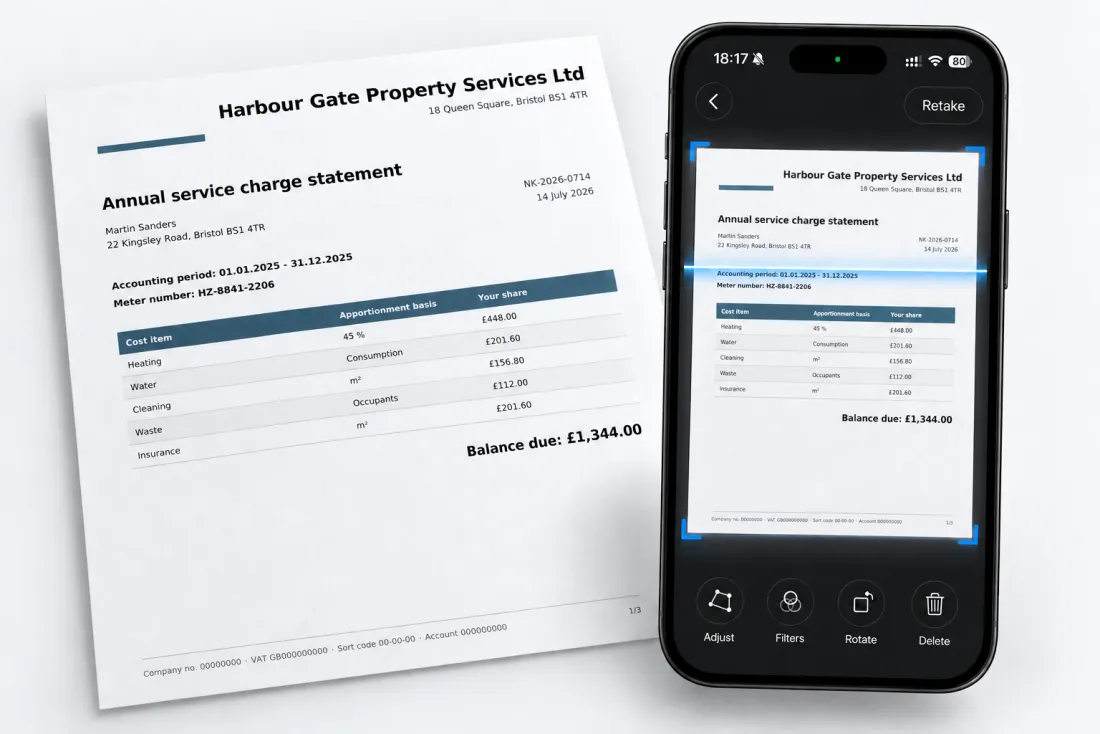
It scans, too: photograph a letter and you have a searchable PDF, with a name already suggested. Arciva simply does not stop there.
Arciva does not organise your documents.
Arciva organises what happens to them.
Nothing forgotten. Nothing overlooked. Nothing missed.
For Mac, iPad and iPhone.

Early buyers pay less than the regular price.
Scan
Letter scanned
Invoice from Strom AG · 09:12
The trigger – the attachment or the file goes into Arciva by photo scan or drag & drop.
Document
invoice.pdf
321 KB · PDF · full text recognised
Note
The amount is wrong
“Ms Berger promised to call back by Thursday.”
Task
Send the objection
Due 15 May
Status
Active
Stickers
Invoices · Electricity · Objection
Done
Corrected and paid
19 May
A case starts with a letter – and ends when the matter is settled.
Important things stay in motion – until they are done.
Invoice, insurance claim or contract: Arciva keeps everything together until the case is closed. Other apps help you file documents. Arciva helps you get things done.
In motion
Thirty seconds, from letter to task
Scan, let the text be recognised, add stickers, create a task with a deadline. Recorded on an iPhone.
What that means day to day
A folder stores. Arciva sees it through.
Closure
Things get done
Every case has a status – new, active, done, archived. The list shows you at a glance what is still in progress and what is finished. Nothing disappears into a folder, unnoticed or forgotten.
Memory
You always know where things stand
The phone call, the name, the promised deadline – your note sits right with the letter it belongs to. When the matter comes back in two months, you read up instead of trying to remember.
Paper
From letter to case – in seconds
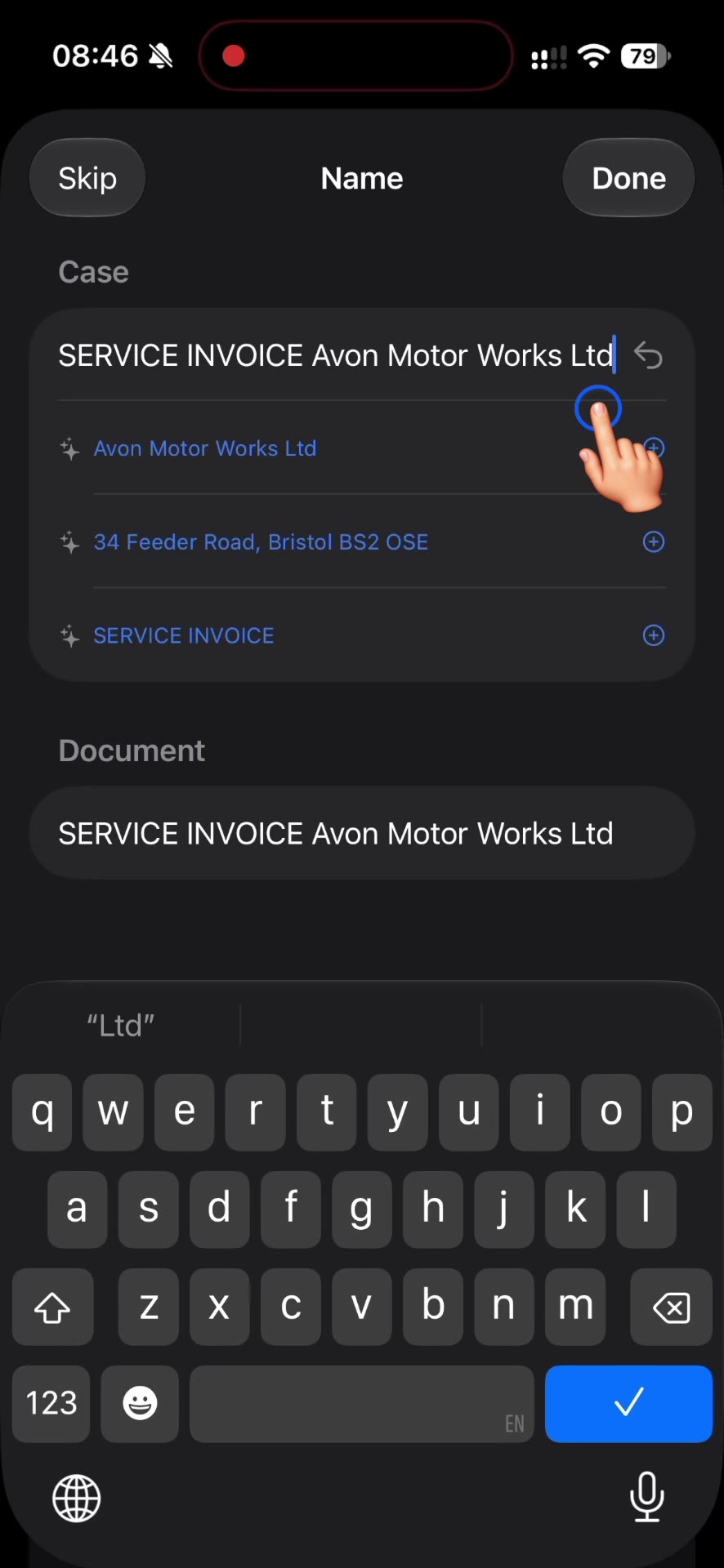
Photograph or scan it: the result is a searchable PDF. Arciva reads the sender and suggests a name. No more “Scan-2347” or “Photo-3428” that nobody can place later on.
Files
Dragging it in is enough
An attachment from an email, an invoice from your downloads folder, a screenshot from your Mac desktop – drop it on the list and the case is created. Here too, Arciva reads the sender and suggests a name.
Deadlines
Dates where you actually see them
Arciva puts tasks into Apple Reminders. They show up on iPhone, Mac, Apple Watch and in Siri – even when Arciva is not open. Ticking them off works there just as well – or in Arciva. Whichever you prefer.
Trust
Your data stays with you
No server of ours, no user account. Everything lives on your devices and in your iCloud – the same account as your photos. Nobody in between that you would have to trust.
Archive
The archive builds itself
What you scan stays. A finished case does not disappear, it stays searchable – years later, by a word from the document or by a sticker. Filter by the Archived status and the search becomes the archive itself.
Stickers instead of folders
A document rarely belongs to just one topic.
Take an invoice from the roofer. It belongs with your invoices – but just as much with the house and with tradespeople. Which folder would you put it in?
With Arciva you don’t have to choose. You put the stickers “Invoice” and “Tradespeople” on the case, and your own structure does the rest:
Finance
Invoice
Click Invoice – the invoice is there. Click Finance – there too, without you ever having applied that sticker.
House
Tradespeople
The same from the other side: through the sticker Tradespeople – and through House above it.
One case. Two stickers. Four ways back to it.
You define the stickers yourself and organise them two levels deep. That way you sort by what something belongs to – not by which single folder you happened to put it in.
Finding things again
Even what you only photographed.
Arciva reads the text out of every document – out of PDFs, out of scanned letters with no text layer, out of photos and screenshots. You search for a word and see not just the case, but which document it sits in.
notice period
Tenancy agreement, Fichtenweg flat
“… the notice period is three months to the end of the quarter …”
2 matches
Photo – letter from the property manager
Photographed, made searchable by text recognition
1 match
Note in the case “Moving house 2026”
“Check the notice period before we agree”
A look inside the app
One case, from scan to done.
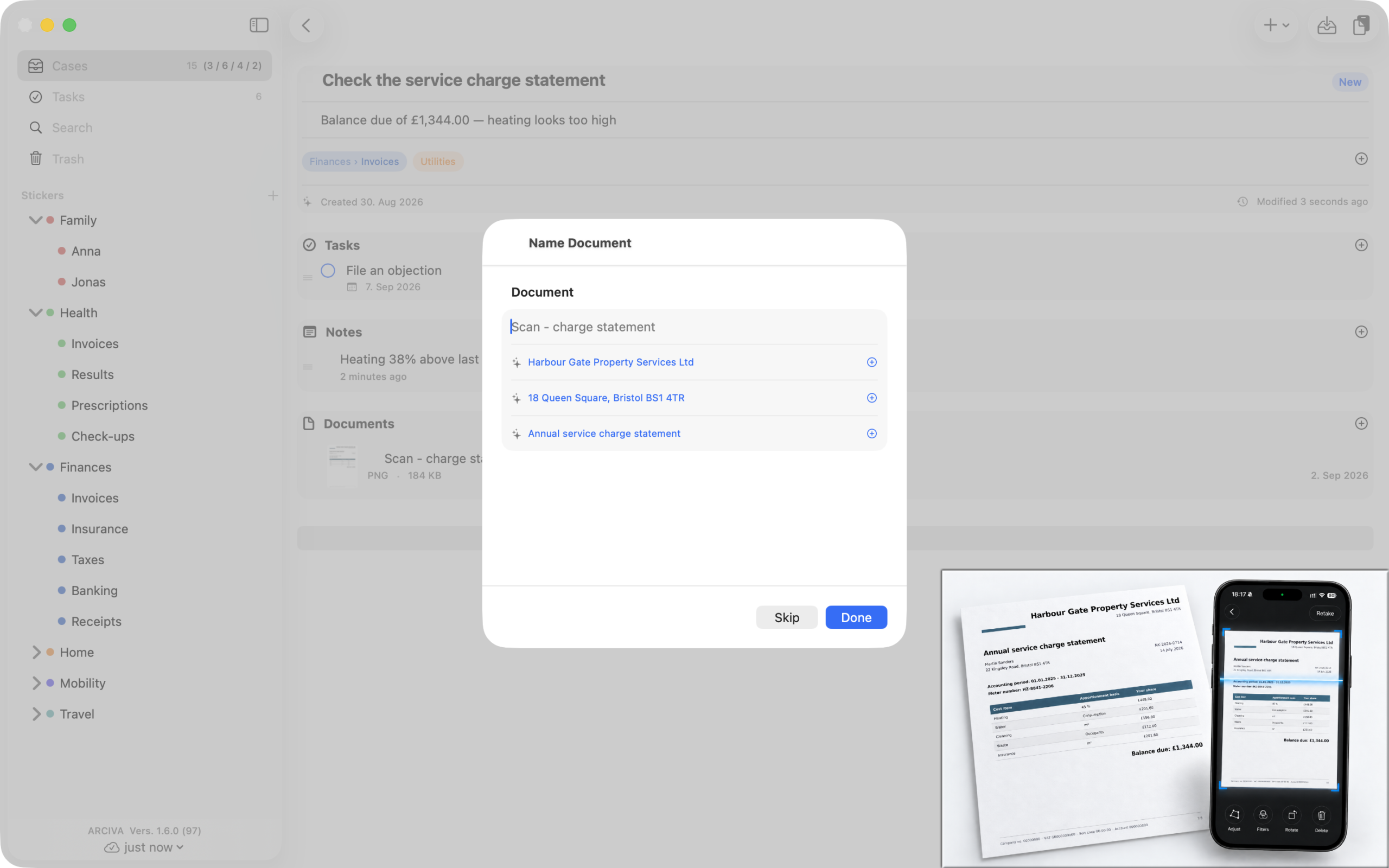
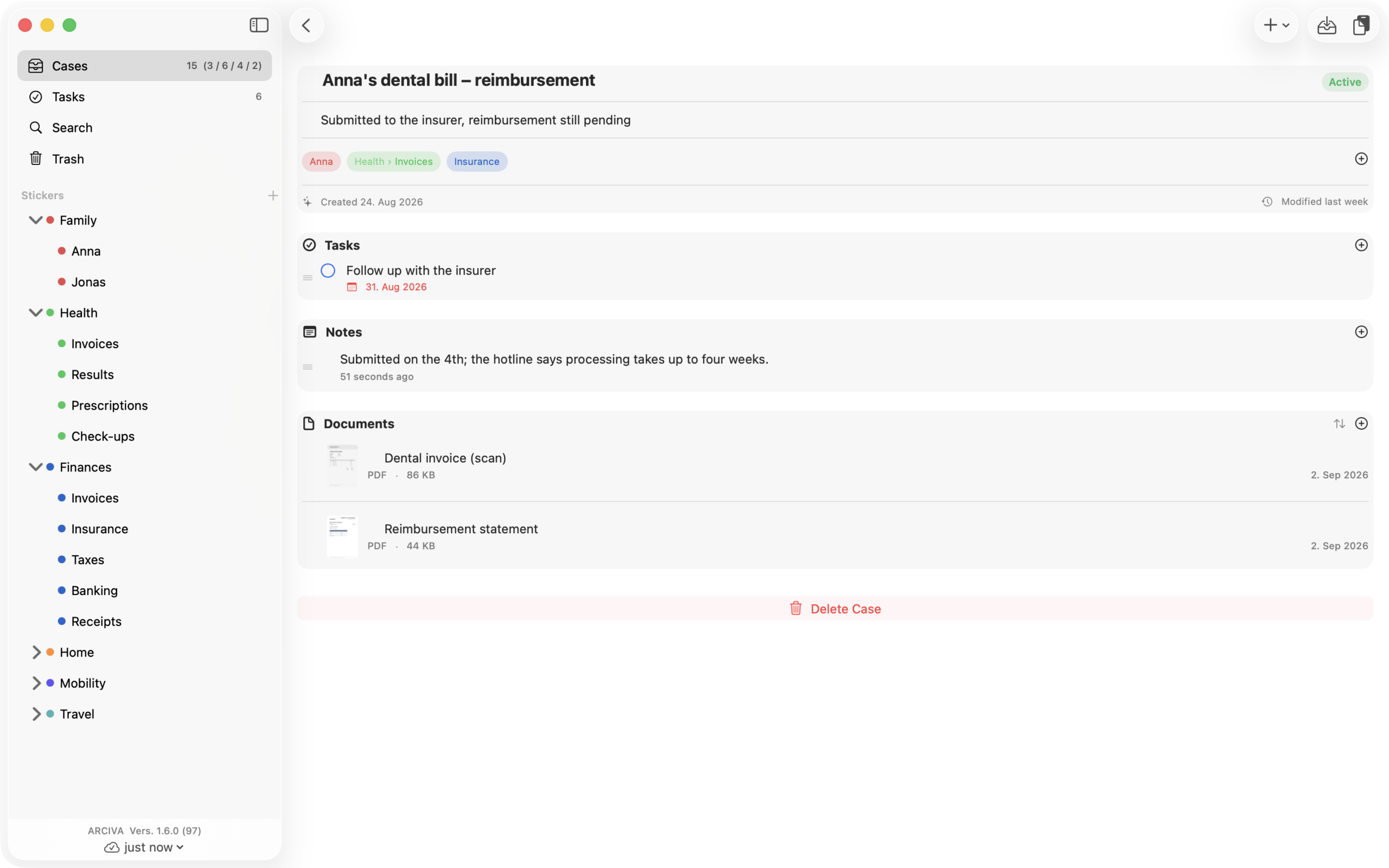
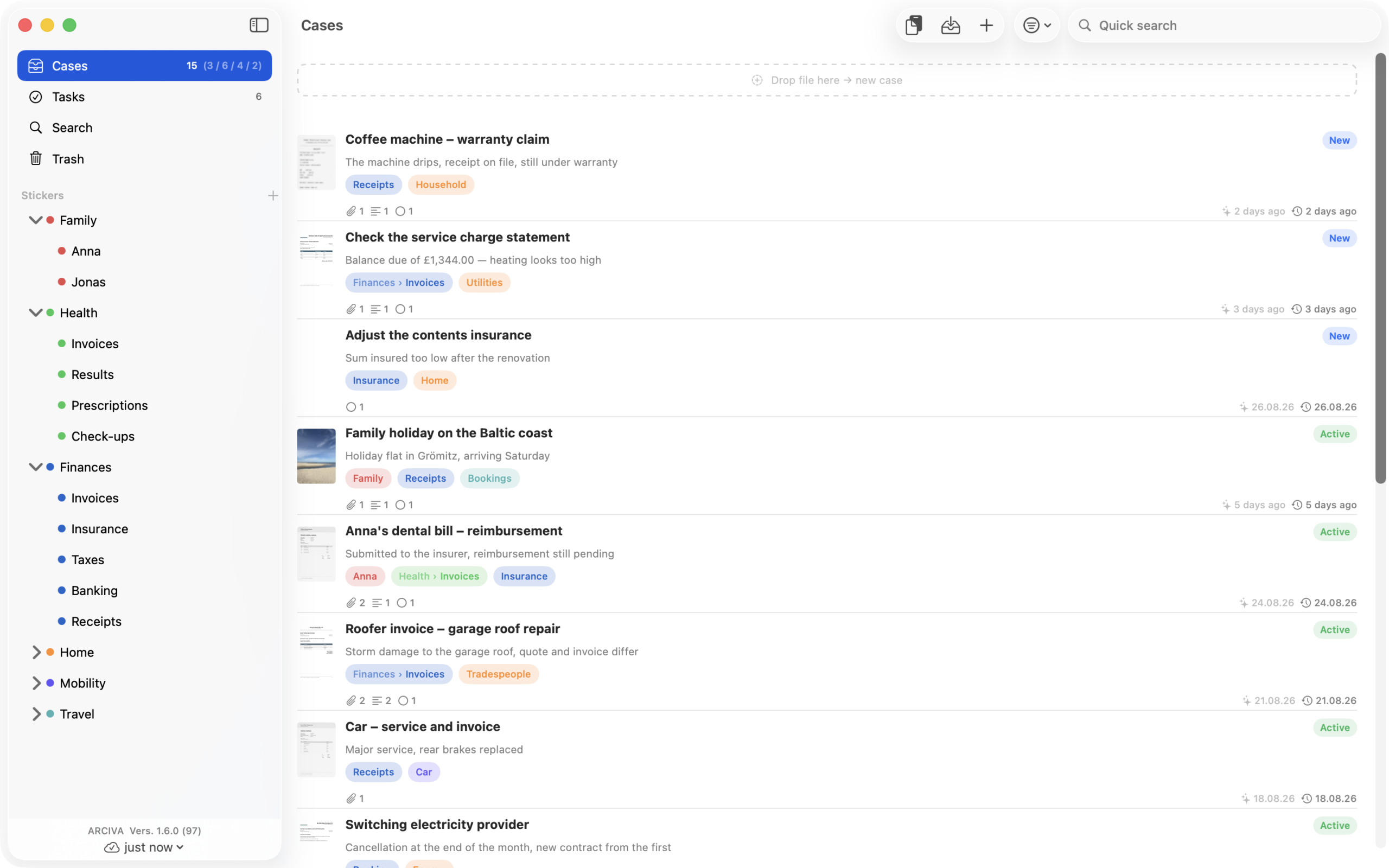
The scan app
A scan is not a finished matter.
In Arciva, scanning is the first step, not the last. The work starts afterwards: checking, asking back, objecting, paying. A PDF knows none of that, however cleanly it was scanned.
A scan app hands you the file. Arciva starts there.
The obvious objection
A folder full of PDFs gets nothing done.
A folder does not know that the invoice still needs checking. It does not know that you objected and are waiting for an answer. It does not know that the deadline falls on the 15th.
A folder stores. Arciva sees it through.
The way out
“And what if I don’t want Arciva any more?”
Arciva writes everything into a folder of your choice – one folder per case, notes as text files, documents in their original form. The folders are named after your cases; you can look through it all in the Finder or in Files, without opening Arciva. Single documents can still be used elsewhere directly: on the Mac you drag one out of the case, on iPhone and iPad you use the share button – a copy is created, nothing in Arciva changes.
And you can come back, too. Arciva reads the same backup back in – into an empty Arciva. Tasks are created anew in Apple Reminders, with their text, date, priority and done state.
On all of your Apple devices.
| Available on | Mac | iPad | iPhone |
|---|---|---|---|
| Cases, notes, tasks, stickers | ✓ | ✓ | ✓ |
| Full-text search incl. scans and photos | ✓ | ✓ | ✓ |
| Scanning documents with the camera | – | ✓ | ✓ |
| Import from the photo library | – | ✓ | ✓ |
No middleman
We do not see your data.
Arciva has no server and no user account. Everything lives on your devices and in your iCloud – the same account that holds your photos and notes. There is nobody in between that you would have to trust.
And if you don’t want Apple reading it either?
Then switch on Advanced Data Protection for iCloud in your settings. After that the keys live on your devices only – and that covers everything Arciva stores: your cases, your notes and your documents.
We build nothing of our own for this. An app that encrypts only its notes and leaves the documents open promises more than it delivers. Apple’s switch covers both.
A copy that is yours
iCloud mirrors. It does not back up.
What disappears on one device disappears everywhere – in seconds. That is why Arciva writes your material into a folder of your choice whenever you ask, including whatever is in the trash. Where it goes is up to you.
A backup nobody ever checks is a promise, not protection. So Arciva can examine an existing backup: is every file still there, does it still have the right size – and, if you ask for it, is it still the same file? Anything missing or wrong is named, not just reported as “incomplete”. Nothing is changed in the process – neither in the backup nor in your data.
Reading it back in works – but only as a whole. Arciva reads a backup back in when nothing is there. If Arciva already holds something, reading in replaces everything; it cannot merge the two.
When a letter is not the end, but the beginning.
For everyone whose matters run for weeks: an insurer that will not pay. An objection that gets no answer. A tradesperson who was supposed to put things right.
Arciva is available for Mac, iPad and iPhone.
A native Apple app, built by a developer who uses it himself.
Arciva is free to download and try out in full: every feature is included – scanning, text recognition, search, stickers, tasks, backup and restore. Only the number is limited – 10 cases and 30 documents, notes unlimited. The trash counts too, until you empty it.
Beyond that, everything you already have stays readable and editable; only new cases and further documents wait for the purchase – by subscription or one-off. Which price applies where you are is shown in the App Store.